10/11/2003 11:09:00 PM - Pinball Statusbar
As first mentioned in an earlier post, Pinball for Firebird now has the statusbar icons on all the time. Using Pinball on Firebird, my statusbar normally looks like 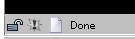 .
.
Visiting a page with a pop up, javascript error, and alternate stylesheet makes it look like  .
.
But what if you don't like that? Then feel free to configure it yourself:
/* Pinball statusbar icons */
/*
#security-button {
  display: none !important;
}

#security-button[level="high"] {
  list-style-image: url("chrome://browser/skin/lock-secure.gif")  !important;
  display: -moz-box;
}

#security-button[level="low"] {
  list-style-image: url("chrome://browser/skin/lock-secure.gif")  !important;
  display: -moz-box;
}

#security-button[level="broken"] {
  list-style-image: url("chrome://browser/skin/lock-broken.gif")  !important;
  display: -moz-box;
}

#page-report-button {
  display: none !important ;
}

#page-report-button[blocked] {
  display: -moz-box;
  list-style-image: url("chrome://browser/skin/
popup-blocked.png")  !important;
  padding: 1px 3px 1px 3px;
}

#page-theme-button {
  display: none !important;
}

#page-theme-button[themes] {
  display: -moz-box;
  list-style-image: url("chrome://browser/skin/page-themes.png") !important;
  padding: 0px 1px 0px 1px;
}
*/
